
![Alt-text: VHF marine radio on a boat dashboard for radio testing VHF Radio Check: How to Test Your Boat's Radio A VHF radio is only as good as its last successful transmission. Plenty of boat owners flip the switch, see the display light up, and assume everything's fine. They never actually test it. Then something goes wrong out on the water, and that's the worst possible moment to discover the radio isn't working. This guide walks through how to run a real VHF radio check, not just a glance at the screen. You'll learn which channel to use, how to confirm both transmit and receive are working, and what the common failure signs actually mean. We see the fallout at Zisser Marine often, especially with boats moored around San Diego Bay. A quick check at the dock beats finding out the hard way, out on the water. Key Takeaways Never use Channel 16 for a radio check. Use 68, 69, 71, or 72 instead. A real check confirms both transmit and receive, not just one. Sea Tow's automated service lets you test alone on Channel 24, 26, 27, or 28. Your DSC and MMSI setup matter as much as basic transmission. The antenna is the most common source of VHF trouble. Test before every serious trip, not just once a year. Why Regular VHF Checks Matter Think of your VHF as safety equipment first, communication tool second. Sure, boaters use it to chat, but its real job is getting you help fast if something goes sideways. Most radios sold today include DSC, or Digital Selective Calling. Press that button and it fires off an automatic distress signal with your location attached. Handy feature, except it only works if the radio's been set up right and hasn't degraded over time. Technically, the Coast Guard doesn't mandate radio checks for recreational boats. That said, everyone on the water, particularly in a busy area like San Diego Bay, expects your gear to actually function. Career captains don't skip this step. Neither should you. Two minutes now versus a silent radio during an emergency isn't much of a trade-off. A few reasons this habit is worth keeping: It confirms your radio will work before you're relying on it It verifies DSC will actually send your location if things go wrong It's simply what other boaters and marinas expect from a seaworthy vessel It catches small issues while they're still cheap and easy to fix Which Channel to Use for a Radio Check Alt-text: Boat operator checking a VHF radio and handheld microphone Getting the channel right matters almost as much as the call itself. Pick the wrong one and you could genuinely interfere with someone else's emergency. Never Use Channel 16 Channel 16 exists for one purpose: distress and safety calls, plus initial contact before switching elsewhere. It was never meant for testing equipment. Keying up on 16 to check your radio ties up a frequency other people might need for an actual emergency. Do it often enough and you might even hear from the Coast Guard about it. Use a Working Channel Instead Routine checks belong on a working channel. Solid options include: Channel 68 Channel 69 Channel 71 Channel 72 These frequencies exist specifically for this kind of non-emergency traffic. Before you key up, just listen for a few seconds. If it's quiet, you're clear to proceed. Automated Radio Check Services Sea Tow offers an automated radio check in a lot of coastal regions, San Diego Bay included. Depending on where you are, it's typically on Channel 24, 26, 27, or 28. Call in and the system responds automatically, confirming how your signal came through. This is a solid option when you're testing solo and don't have another boater around to respond. How to Perform a VHF Radio Check There's a right order to doing this, and skipping steps tends to give you a false sense that everything's working when it isn't. Here's the full process. Power on your radio. Give it a moment to fully boot. Make sure the display shows normal signal bars. Set the squelch. Turn the knob until static clears, then back it off just slightly. This keeps the radio silent until it picks up a real signal. Pick a working channel. Stick with 68, 69, 71, or 72. Steer clear of 16. Key the mic and speak. State your boat name, then say "radio check" clearly. Be specific. Something like: "This is [Boat Name], requesting a radio check on this channel." Release and wait. Give it a few seconds for someone to respond. Listen to the reply. A nearby boater or the automated service will describe how you sound, "loud and clear" or "broken up" being the usual responses. Write it down. Log the date and result so you can track how your radio performs over time. Do this and you've confirmed two things at once: your radio transmits, and someone out there can actually hear it. Testing Transmit and Receive Separately Hearing other boaters chatter doesn't mean your radio is fully functional. That's only one half of the equation, and a lot of owners stop there. Confirming You Can Receive This part's simple. Turn the radio on, scan a few channels, and listen. If voices come through, your receiver's doing its job. But that tells you nothing about your transmitter. Plenty of owners assume their radio works because they can hear traffic, without ever confirming anyone can hear them back. Confirming Others Can Hear You For this, you need a response from someone else. That's the whole point of an actual radio check rather than just passive listening. Ask a nearby boater to rate your signal clarity Try an automated radio check service if your area has one Take note of whether the reply was clear, weak, or garbled If you can hear traffic fine but no one responds to your calls, the issue is almost certainly on your transmit side, often the mic, antenna, or wiring. Checking Your DSC and MMSI DSC tends to be the most neglected part of a VHF setup, which is unfortunate given it might matter most in a real emergency. What DSC Does Digital Selective Calling sends an automatic distress alert the moment you press the button, complete with your boat's identity and, if connected to a GPS source, your exact position. Most newer radios include a built-in DSC test call feature, letting you send a test signal to another DSC-equipped radio just to confirm everything's functioning. Why Your MMSI Must Be Correct Your MMSI, short for Maritime Mobile Service Identity, is a unique number tied to your vessel. It has to be entered correctly for DSC to do its job. Get it wrong, leave it blank, or never program it at all, and your distress signal won't carry accurate information. Rescuers may have no idea who's calling or where to find you. Give your MMSI a check once a year and confirm it lines up with your registration. It's a small task that a lot of owners simply forget about. Common VHF Problems and What They Mean A radio check often surfaces problems before they become genuine emergencies. Here's what different symptoms usually point to: No Transmit If you can hear others but they can't hear you, start with the microphone connection. Loose or corroded connectors are a frequent culprit. Weak Signal A faint or choppy signal typically traces back to the antenna, whether that's coax cable damage, a loose fitting, or the antenna itself failing. No Receive Dead silence, even on channels you know are busy, often signals a power problem or a faulty antenna connection. Antenna Faults Antennas are the single biggest source of VHF trouble, hands down. Sun exposure and salt air wear them down steadily over the years, and that's especially true for boats sitting in San Diego Bay. A cracked base or a damaged cable can quietly cut your range in half without you noticing right away. Power and Wiring Issues Loose battery terminals, blown fuses, corroded wiring, all of these can chip away at your radio's performance. They're often intermittent too, which makes them frustrating to track down without the right tools. Spotting any of these signs is a good reason to get things looked at properly. A marine electronics installation check can catch issues that aren't obvious from the helm. When to Call a Marine Electronics Installer Alt-text: Boat captain using VHF radio to test marine communication Some VHF issues are easy DIY fixes. Others really need a professional eye. Reach out to one if you notice any of these: Your antenna needs replacing You suspect a wiring problem somewhere Your DSC or MMSI needs correcting or programming The radio won't power on at all Your signal has been unreliable for more than one trip in a row This is exactly the kind of work Zisser Marine handles day to day, antenna replacement, wiring repair, DSC programming, for boats all across San Diego Bay and beyond. We'd rather fix it right the first time than see you back here for the same issue. If your last radio check didn't go the way it should have, don't brush it off. Have your VHF and antenna checked by our team before you head out again. Frequently Asked Questions (FAQs) What channel do I use for a radio check? Stick to a working channel like 68, 69, 71, or 72. Some regions also offer an automated Sea Tow radio check on Channel 24, 26, 27, or 28. Can I use Channel 16 to test my radio? No. That channel is reserved strictly for distress, safety, and initial contact. Testing on it can interfere with real emergencies. Why can I hear but not transmit? Usually a microphone, antenna, or wiring problem. Your receiver can work perfectly fine while your transmitter has an issue. How often should I test my VHF? Before every serious trip, ideally. At the very least, once a month, and always before heading offshore for a longer run. What does DSC do on my VHF radio? It automatically sends a distress signal along with your boat's identity and location, assuming your MMSI is programmed correctly. Who should I call if my VHF radio check fails? A marine electronics specialist like Zisser Marine. We can pinpoint antenna, wiring, or programming problems quickly. Wrapping Up A working VHF radio isn't optional gear; it's a safety essential. The check itself takes minutes, but skipping it can cost you far more when it actually matters. Build radio checks into your routine before every serious trip. Confirm the right channel, test transmit and receive separately, and give your DSC setup a look at least once a year. If your last check didn't go smoothly, don't let it slide. We are Zisser Marine, and we'll get your radio back to full working condition, the first time around. Speak with our marine technicians to get professional help and restore your radio to proper working condition. VHF marine radio on a boat dashboard for radio testing](https://zmarineservice.com/wp-content/uploads/2026/08/VHF-marine-radio-on-a-boat-dashboard-for-radio-testing.png)
VHF Radio Check: How to Test Your Boat’s Radio
A VHF radio is only as good as its last successful transmission. Plenty of boat owners flip the switch, see the display light up, and assume everything’s fine. They never actually test it. Then something goes wrong out on the water, and that’s the worst possible moment to discover the radio isn’t working.
This guide walks through how to run a real VHF radio check, not just a glance at the screen. You’ll learn which channel to use, how to confirm both transmit and receive are working, and what the common failure signs actually mean.
We see the fallout at Zisser Marine often, especially with boats moored around San Diego Bay. A quick check at the dock beats finding out the hard way, out on the water.
Key Takeaways
- Never use Channel 16 for a radio check. Use 68, 69, 71, or 72 instead.
- A real check confirms both transmit and receive, not just one.
- Sea Tow’s automated service lets you test alone on Channel 24, 26, 27, or 28.
- Your DSC and MMSI setup matter as much as basic transmission.
- The antenna is the most common source of VHF trouble.
- Test before every serious trip, not just once a year.
Why Regular VHF Checks Matter
Think of your VHF as safety equipment first, communication tool second. Sure, boaters use it to chat, but its real job is getting you help fast if something goes sideways.
Most radios sold today include DSC, or Digital Selective Calling. Press that button and it fires off an automatic distress signal with your location attached. Handy feature, except it only works if the radio’s been set up right and hasn’t degraded over time.
Technically, the Coast Guard doesn’t mandate radio checks for recreational boats. That said, everyone on the water, particularly in a busy area like San Diego Bay, expects your gear to actually function. Career captains don’t skip this step. Neither should you.
Two minutes now versus a silent radio during an emergency isn’t much of a trade-off. A few reasons this habit is worth keeping:
- It confirms your radio will work before you’re relying on it
- It verifies DSC will actually send your location if things go wrong
- It’s simply what other boaters and marinas expect from a seaworthy vessel
- It catches small issues while they’re still cheap and easy to fix
Which Channel to Use for a Radio Check
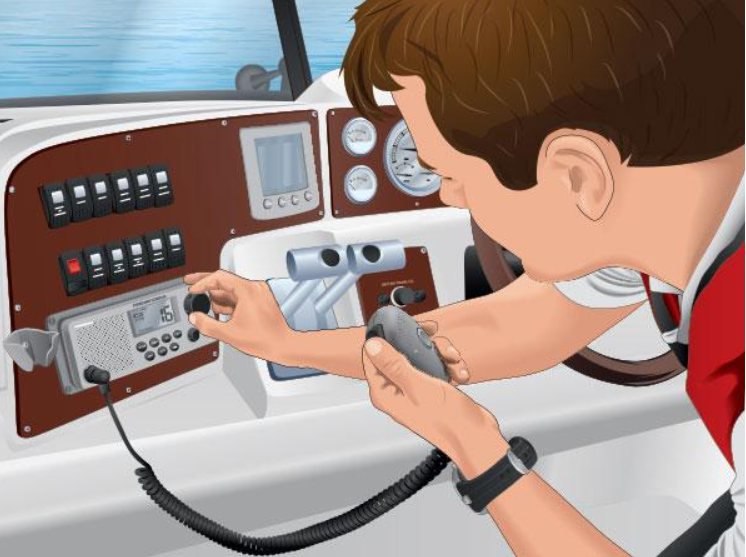
Getting the channel right matters almost as much as the call itself. Pick the wrong one and you could genuinely interfere with someone else’s emergency.
Never Use Channel 16
Channel 16 exists for one purpose: distress and safety calls, plus initial contact before switching elsewhere. It was never meant for testing equipment.
Keying up on 16 to check your radio ties up a frequency other people might need for an actual emergency. Do it often enough and you might even hear from the Coast Guard about it.
Use a Working Channel Instead
Routine checks belong on a working channel. Solid options include:
- Channel 68
- Channel 69
- Channel 71
- Channel 72
These frequencies exist specifically for this kind of non-emergency traffic. Before you key up, just listen for a few seconds. If it’s quiet, you’re clear to proceed.
Automated Radio Check Services
Sea Tow offers an automated radio check in a lot of coastal regions, San Diego Bay included. Depending on where you are, it’s typically on Channel 24, 26, 27, or 28. Call in and the system responds automatically, confirming how your signal came through.
This is a solid option when you’re testing solo and don’t have another boater around to respond.
How to Perform a VHF Radio Check
There’s a right order to doing this, and skipping steps tends to give you a false sense that everything’s working when it isn’t. Here’s the full process.
- Power on your radio. Give it a moment to fully boot. Make sure the display shows normal signal bars.
- Set the squelch. Turn the knob until static clears, then back it off just slightly. This keeps the radio silent until it picks up a real signal.
- Pick a working channel. Stick with 68, 69, 71, or 72. Steer clear of 16.
- Key the mic and speak. State your boat name, then say “radio check” clearly.
- Be specific. Something like: “This is [Boat Name], requesting a radio check on this channel.”
- Release and wait. Give it a few seconds for someone to respond.
- Listen to the reply. A nearby boater or the automated service will describe how you sound, “loud and clear” or “broken up” being the usual responses.
- Write it down. Log the date and result so you can track how your radio performs over time.
Do this and you’ve confirmed two things at once: your radio transmits, and someone out there can actually hear it.
Testing Transmit and Receive Separately
Hearing other boaters chatter doesn’t mean your radio is fully functional. That’s only one half of the equation, and a lot of owners stop there.
Confirming You Can Receive
This part’s simple. Turn the radio on, scan a few channels, and listen. If voices come through, your receiver’s doing its job.
But that tells you nothing about your transmitter. Plenty of owners assume their radio works because they can hear traffic, without ever confirming anyone can hear them back.
Confirming Others Can Hear You
For this, you need a response from someone else. That’s the whole point of an actual radio check rather than just passive listening.
- Ask a nearby boater to rate your signal clarity
- Try an automated radio check service if your area has one
- Take note of whether the reply was clear, weak, or garbled
If you can hear traffic fine but no one responds to your calls, the issue is almost certainly on your transmit side, often the mic, antenna, or wiring.
Checking Your DSC and MMSI
DSC tends to be the most neglected part of a VHF setup, which is unfortunate given it might matter most in a real emergency.
What DSC Does
Digital Selective Calling sends an automatic distress alert the moment you press the button, complete with your boat’s identity and, if connected to a GPS source, your exact position.
Most newer radios include a built-in DSC test call feature, letting you send a test signal to another DSC-equipped radio just to confirm everything’s functioning.
Why Your MMSI Must Be Correct
Your MMSI, short for Maritime Mobile Service Identity, is a unique number tied to your vessel. It has to be entered correctly for DSC to do its job.
Get it wrong, leave it blank, or never program it at all, and your distress signal won’t carry accurate information. Rescuers may have no idea who’s calling or where to find you.
Give your MMSI a check once a year and confirm it lines up with your registration. It’s a small task that a lot of owners simply forget about.
Common VHF Problems and What They Mean
A radio check often surfaces problems before they become genuine emergencies. Here’s what different symptoms usually point to:
No Transmit
If you can hear others but they can’t hear you, start with the microphone connection. Loose or corroded connectors are a frequent culprit.
Weak Signal
A faint or choppy signal typically traces back to the antenna, whether that’s coax cable damage, a loose fitting, or the antenna itself failing.
No Receive
Dead silence, even on channels you know are busy, often signals a power problem or a faulty antenna connection.
Antenna Faults
Antennas are the single biggest source of VHF trouble, hands down. Sun exposure and salt air wear them down steadily over the years, and that’s especially true for boats sitting in San Diego Bay. A cracked base or a damaged cable can quietly cut your range in half without you noticing right away.
Power and Wiring Issues
Loose battery terminals, blown fuses, corroded wiring, all of these can chip away at your radio’s performance. They’re often intermittent too, which makes them frustrating to track down without the right tools.
Spotting any of these signs is a good reason to get things looked at properly. A marine electronics installation check can catch issues that aren’t obvious from the helm.
When to Call a Marine Electronics Installer
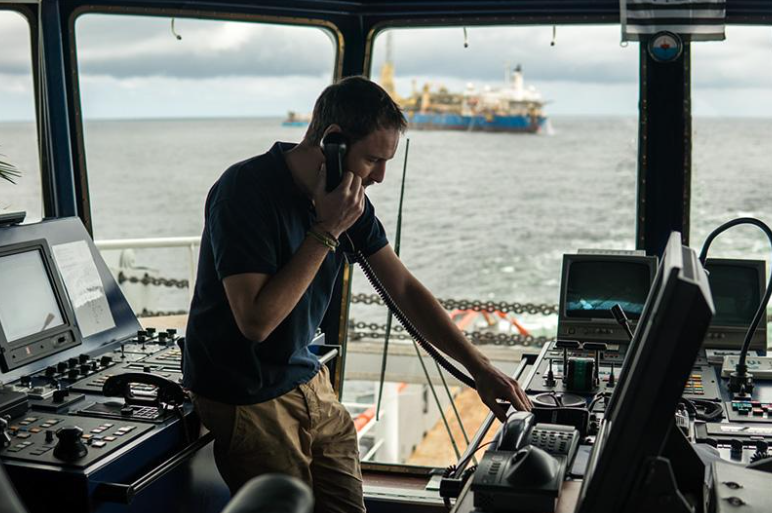
Some VHF issues are easy DIY fixes. Others really need a professional eye. Reach out to one if you notice any of these:
- Your antenna needs replacing
- You suspect a wiring problem somewhere
- Your DSC or MMSI needs correcting or programming
- The radio won’t power on at all
- Your signal has been unreliable for more than one trip in a row
This is exactly the kind of work Zisser Marine handles day to day, antenna replacement, wiring repair, DSC programming, for boats all across San Diego Bay and beyond. We’d rather fix it right the first time than see you back here for the same issue.
If your last radio check didn’t go the way it should have, don’t brush it off. Have your VHF and antenna checked by our team before you head out again.
Frequently Asked Questions (FAQs)
What channel do I use for a radio check?
Stick to a working channel like 68, 69, 71, or 72. Some regions also offer an automated Sea Tow radio check on Channel 24, 26, 27, or 28.
Can I use Channel 16 to test my radio?
No. That channel is reserved strictly for distress, safety, and initial contact. Testing on it can interfere with real emergencies.
Why can I hear but not transmit?
Usually a microphone, antenna, or wiring problem. Your receiver can work perfectly fine while your transmitter has an issue.
How often should I test my VHF?
Before every serious trip, ideally. At the very least, once a month, and always before heading offshore for a longer run.
What does DSC do on my VHF radio?
It automatically sends a distress signal along with your boat’s identity and location, assuming your MMSI is programmed correctly.
Who should I call if my VHF radio check fails?
A marine electronics specialist like Zisser Marine. We can pinpoint antenna, wiring, or programming problems quickly.
Wrapping Up
A working VHF radio isn’t optional gear; it’s a safety essential. The check itself takes minutes, but skipping it can cost you far more when it actually matters.
Build radio checks into your routine before every serious trip. Confirm the right channel, test transmit and receive separately, and give your DSC setup a look at least once a year.
If your last check didn’t go smoothly, don’t let it slide. We are Zisser Marine, and we’ll get your radio back to full working condition the first time around. Speak with our marine technicians to get professional help and restore your radio to proper working condition.